
- To begin the full restoration of a cPanel account on both KVM and Legacy VPS accounts.
-
- Log in to WHM as root.
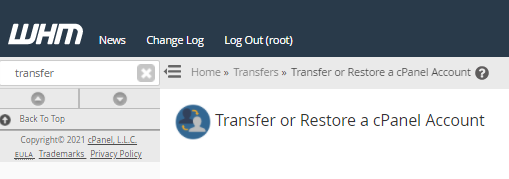
- Search Transfer or Restore a cPanel Account at the search function on the left-hand side.
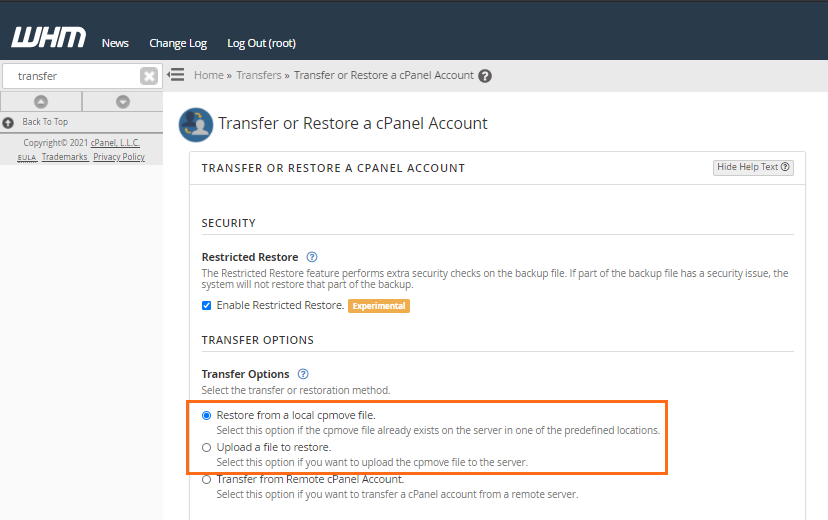
- Select either Restore from a local cpmove file or Upload a file to restore based on where you have the file stored:
- Restore from a local cpmove file: This option if the cpmove file already exists on the server in one of the predefined locations.
- Upload a file to restore: This option if you want to upload the cpmove file to the server.
- Place a checkmark next to Overwrite the existing user to allow cPanel to overwrite the existing cPanel account.

Warning: If you have a different account on this server with the same cPanel username, it WILL be overwritten, destroying the account’s contents. -
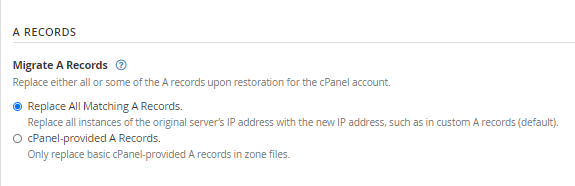
- Select whether to replace all instances of the original server’s IP address with the new address or only replace basic cPanel-provided A records in zone files (Either option should be sufficient if you are not attempting to migrate data).
- Click the Restore button.
The restoration process will now begin. Please be aware that the process requires the active use of multiple applications, such as MySQL. Do NOT shut down or restart any processes on the server during the restore process.