
Backups are very important in a website. If you created a backup using Softaculous but would need to delete an old copy of your backup due to disk space issues, for example, you can do so via the Softaculous application. This article will guide you in deleting your old backup using Softaculous.
- Log in to cPanel.
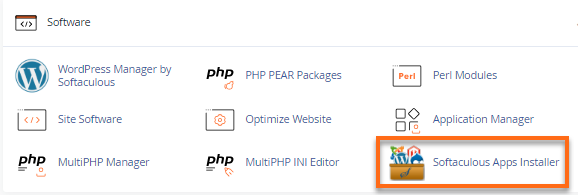
- Look for the Software section, then click on Softaculous Apps Installer.
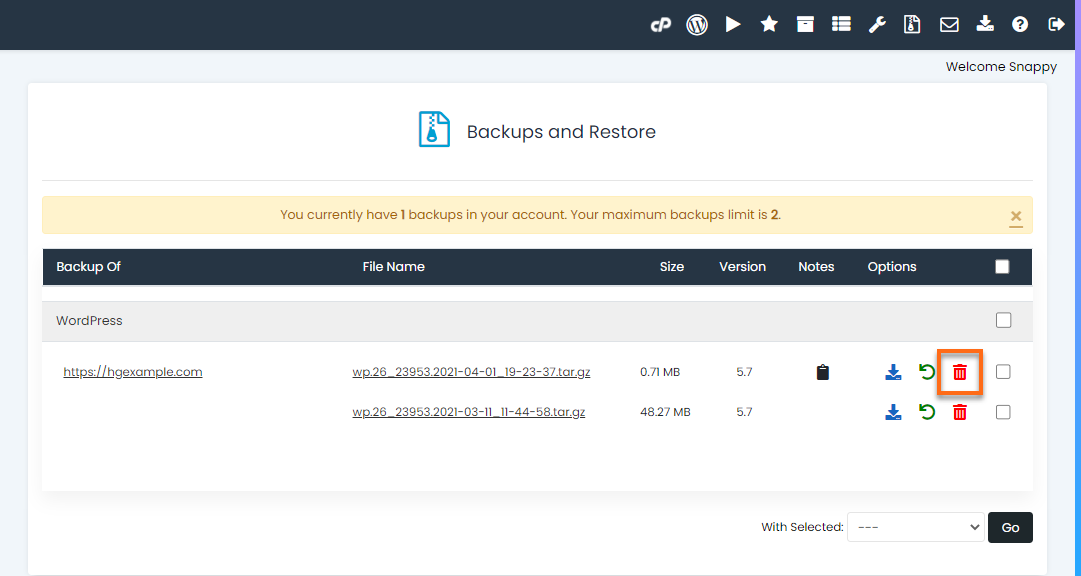
- Click the Backups and Restore icon located at the top right menu.

- Locate the backup you wish to delete on the Backups and Restore section.
Please note that deleting an old backup is irreversible so please make sure you select the correct backup.
- To delete the backup, click the trash bin icon.
- A pop-up window will appear, requesting confirmation. Click OK to proceed.
You have now successfully deleted your backup.