
In Linux systems, mod_deflate is used to compress HTTP content before it is served to the client; this results in faster network transfers.
Compressing Content
Apache 2.0, 2.2, and 2.4 allow you to compress content using mod_deflate before sending it to the visitor’s browser. The types of content to be compressed are specified by MIME type. The mod_deflate module provides similar functionality as mod_gzip.
Mod_deflate is available on all our Linux based hosting packages, including Shared, Reseller, VPS, and Dedicated Server plans.
Note: These settings will be applied to your entire cPanel account.
You can enable or disable it in cPanel by doing the following:
- Log in to cPanel.
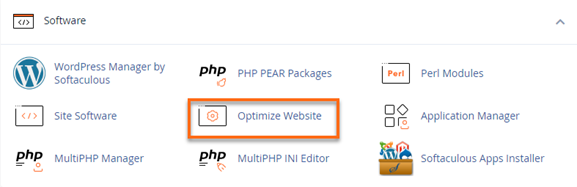
- In the Software section, click on Optimize Website.
- Under Compress Content, select the appropriate option:
- To disable compression of your website’s content, select Disabled
- To compress all of your website’s content, select Compress All Content
- To specify a list of types of content to compress, select Compress the specified MIME types. Enter a space-separated list of the types of content that you wish to compress in the MIME Types text box (for example,
text/html text/plain text/xml).Note:- Do not include any image file formats in the list. Image file formats (for example, .jpg and .png) already compress data.
- Apache will compress PHP content if you enable the zlib.output_compression setting in cPanel’s MultiPHP INI Editor interface.
- For more information, view For more information, view Proper MIME Types
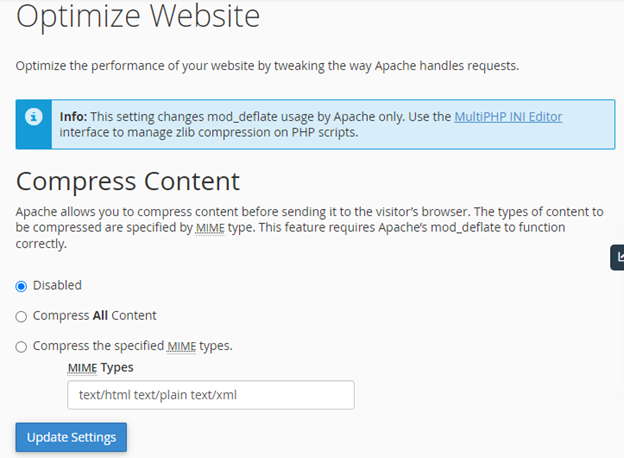
- Click Update Settings.