
- Log in to cPanel.
- Look for the Security section, then click on SSL/TLS.
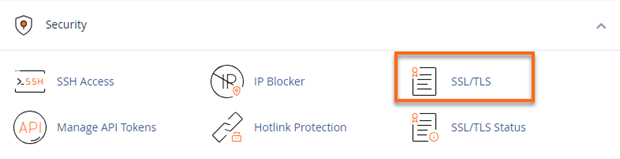
- Under Certificate Signing Requests (CSR), click the Generate, view, or delete SSL certificate signing requests link.
- Fill out the necessary fields on the next page.
- Click Generate.
Related Articles
-
How to Upgrade Hosting Plan in WHMCS
- 0
- 15
-
How to Change Billing Cycle in WHMCS
- 0
- 18
-
How to Generate Invoice for Advance Hosting Renewal
- 0
- 16
-
How to Whitelist an IP Address in WHM
- 0
- 103
-
How to Add a Domain to Cloudflare and Point it to Hosting IP
- 0
- 83
-
How to Enable or Disable Shell Access in WHM
- 0
- 81